 Alumanel Docs
A ticket is a single customer request. Here is the full loop.
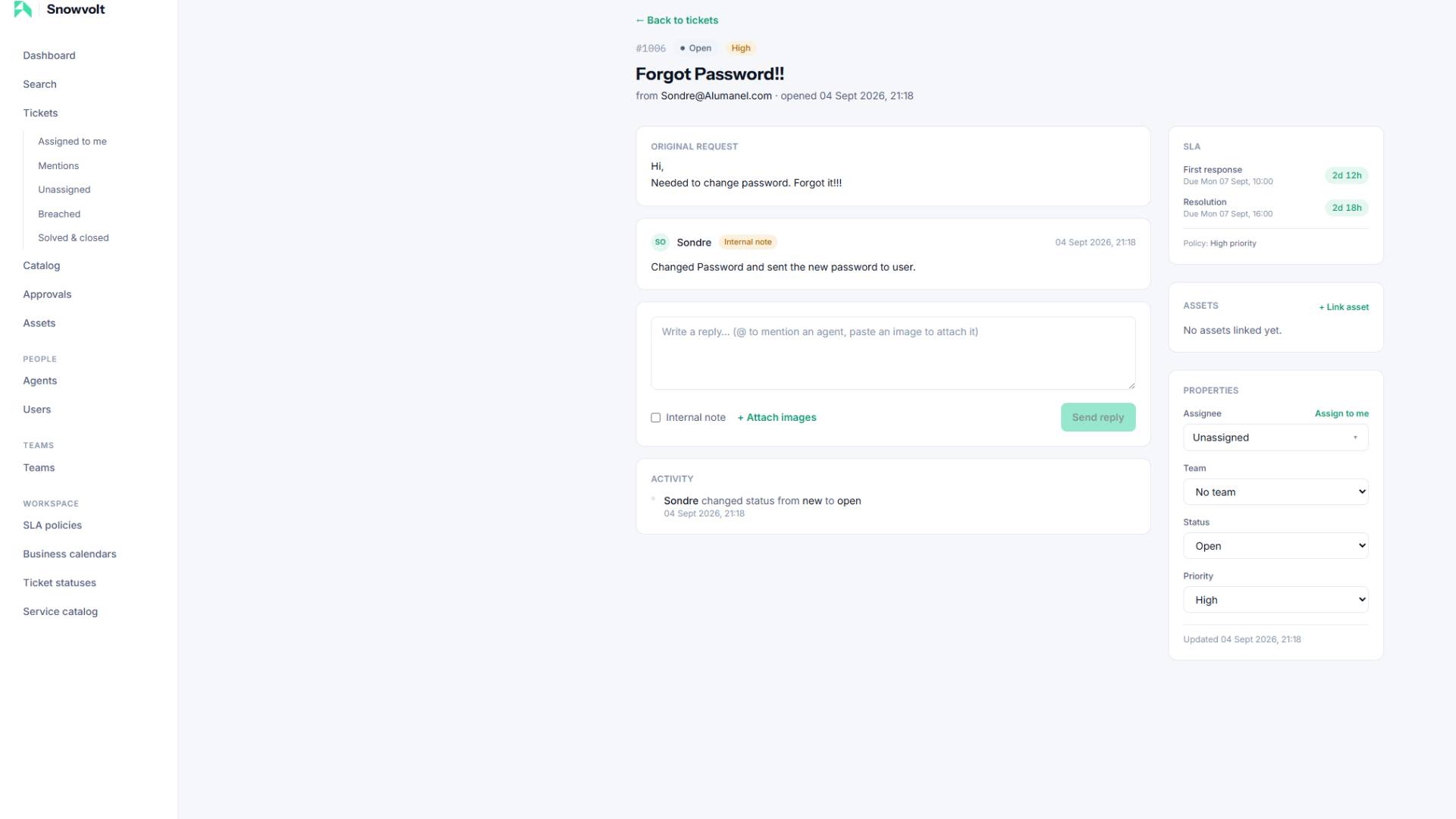
1. Pick it up
Open Tickets to see the queue. Use the filters (status, priority, assignee) to focus. Click a ticket to open it.
2. Triage
Set the essentials at the top of the ticket:
- Priority — Urgent, High, Normal, or Low. This drives SLA targets.
- Assignee — the agent responsible.
- Team — the group handling it (drives which working hours its SLA uses).
3. Reply
Use the reply box to answer the customer. Public replies are emailed to the requester and appear in their Portal. Internal notes stay private to agents.
4. Change status
Move the ticket through your statuses — for example Open -> Pending -> Resolved. Some statuses pause the SLA clock (like waiting on the customer); your admin configures that.
5. Fulfillment
For catalog requests, work the fulfillment checklist and leave fulfillment notes so there is a clear record of what was done.
6. Resolve
When the work is complete, set the ticket to a resolved status. This satisfies the resolution SLA and notifies the customer.
Learn how the timers work in SLA policies explained.